Nobody enjoys dictating passwords. Guests mistype characters, you repeat yourself a dozen times a day, and complex passwords make the situation worse. A WiFi QR code flips the experience: your guest points their camera at the code, taps Join, and they are online — the phone fills in the password itself.
How a WiFi QR code works
Behind the image is a plain text string that every modern phone understands. When you scan one, the camera app detects the WIFI: format and offers to join that network directly. The string encodes four things: the network name (SSID), the password, the security type, and whether the network is hidden. That is the entire trick — no app is needed on the guest's side, and nothing is sent to any server.
The format is supported by iPhone (iOS 11+), Android, and even Windows 10/11laptops. The only real requirement is a camera and the built-in QR reading that ships with all recent devices.
Create your code in one minute
The free Toolora WiFi QR Generatorwalks you through it:
- Enter your network name. Copy it exactly from your router — SSIDs are case-sensitive, and a single different letter means the phone will not find the network.
- Pick the security type. WPA/WPA2/WPA3 covers almost every router made in the last decade. Use WEP only for very old equipment, or "Open" for a password-free guest network.
- Type the password. The code works just as well with a 20-character password as with a short one — the guest never types it anyway.
- Generate and download. Click once and save the PNG, ready to print or embed in a welcome PDF.
Everything runs locally in your browser: your password is never uploaded, which matters when you are the person handing it out.
Where to place it
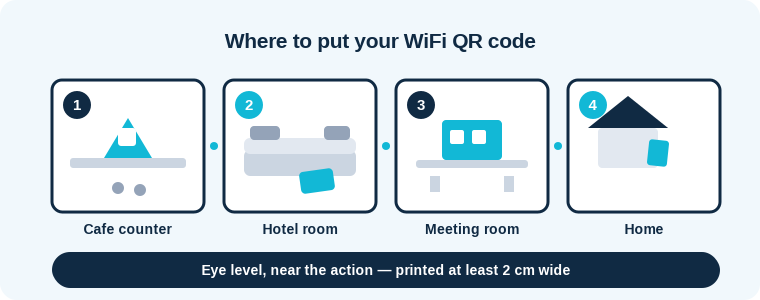
- Cafe and restaurant: a table tent on the counter, or printed at the bottom of the menu. Add a one-liner like "Scan to join our WiFi".
- Hotel, B&B, Airbnb: a small card next to the bed or on the welcome folder. Guests arrive tired at 11 pm; this is the moment they want internet.
- Meeting room: on the slide deck's closing screen or taped to the table. Visitors connect without asking an assistant.
- Home: on the fridge, for the family, the cleaner and the plumber who asks every single visit.
Five tips for a code that always works
- Print it at least 2 cm wide. Small codes fail at arm's length; a 4–5 cm code scans instantly from a natural phone position.
- Use a guest network, not your main one. Anyone with the code can join — keep personal devices on a separate SSID. Most routers offer a "Guest" network option in two clicks.
- Test with two phones. One iPhone and one Android, at the real distance a guest would stand. Thirty seconds that avoid a week of "it doesn't work".
- Keep it matte and contrasted. Dark modules on white — never reversed, never behind glass that catches glare, never printed smaller than the code needs.
- Regenerate when the password changes. The QR code is static: if you rotate the password, print a new one and remove the old code the same day.
Create your WiFi QR code now
Free, private, no sign-up. Your password never leaves your browser.
Open the WiFi QR Generator →Frequently asked questions
Is it safe to share my password in a QR code?
It is exactly as safe as telling the password to everyone who walks in — the code just spares them the typing. The risk is identical to what you already do; the fix is to put guests on an isolated guest network rather than to hide the password.
Do guests see the password after scanning?
No. The phone stores the credentials internally, like any saved network. Depending on the device's security settings, a user could still view saved passwords, but the scan itself does not display it.
Does it work with 5GHz networks?
Yes. The code encodes the network name and password, not the radio band. The only edge case is a phone without 5GHz support on a 5GHz-only SSID — if your network broadcasts on both bands, prefer the 2.4GHz SSID for maximum compatibility.
What about hidden networks?
Hidden SSIDs work, but tick the "Hidden network" option when you generate the code — otherwise the phone will not find the network even with the right password.
Does the code ever expire?
Never. The credentials are encoded directly in the image; there is no redirect service that could shut down or start charging you. The code only stops working when the network's own password changes.